 Agile Tortoise
Tally Sets
Documentation for tally set configuration.
Tally Sets
In Tally, all individual tallies are organized into sets. A set contains a group of related tallies for each item you are keeping up with. To configure a set, select “Edit Set” from the ... menu.
Creating Sets
Tally provides several ways to create tally sets:
- Generate Tally Set: Use natural language to describe your set, and have AI generate the set for you. Only available on devices running iOS 27 or greater, with Apple Intelligence enabled. Makes it very easy to set up complex tally sets with minimal tapping. Just type (or dictate) simple descriptions, and let tally create the set. A few examples:
- Score a game with 5 players
- Inventory t-shirts sized XS-XXL
- Track workout set tracking Arms, Legs, and Core reps, each with a target of 10
- Set Generation Overview Video
- Quick Tally Set: For basic, simple sets with default tally options, the quick set tool allows you to just list the names of the tallies in the set. Great for things like scoring a board game.
- Create Tally Set: Use the full editor to control all options of the tally set and tallies.
Regardless of how you create a set, you can edit all of its options afters in the editor. For details of available options, continue reading.
Set Options
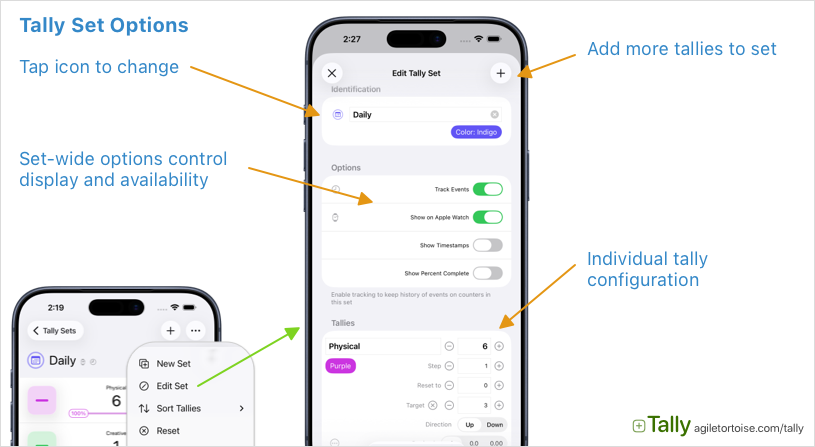
- Identification
- Name: Descriptive name for the set
- Icon: Identification icon. Tap the icon to select.
- Tint Color: Select a default tint color for the set
- Options
- Track Events: If enabled, events that modify tallies in the set will be tracked. This includes adding to, subtracting from, resetting, etc. Learn more about events.
- Show on Apple Watch: Control whether this set is synced to the Apple Watch app.
- Show Timestamps: Increases visibility of last change timestamps on tallies.
- Show Percent Complete: For tallies with targets, in addition to showing a progress indicator, also include the percent complete.
Tally Options
Within a set, each tally has its own set of configuration options to control the behavior of the tally. By default, tallies simply count up by one each time they are incremented, but the options below allow for configuration of a wide variety of counting uses.
- Name: Descriptive name
- Tint Color: Highlight color
- Value: Current value of the tally
- Step: How much to increase or decrease the tally for each counting action. For example, a step of 5 results in a tally that counts 0, 5, 10, 15, etc.
- Initial: The value to set the tally when a reset is performed. Defaults to zero.
- Target: Optional target value to track progress. If a target is provided, Tally displays a progress indicator along with the tally. Useful for habit tracking, or other applications where the counter has a completed state.
- Direction Default counting direction. Setting to “Down” flips the
+and-actions. - Decimal Places Display this tally with decimal places. Useful when keeping up with fractional values. Note that under-the-hood, all tallies are integer based. This is a display feature that shows values with a shifted decimal place for convenience.
- Reset Configure periodic, automatic reset intervals for this tally. If enabled, each time the interval is reached, the tally will reset to its initial value. Great for habit tracking. Options include daily, weekly, monthly resets.
Commands are also available in the ... menu on each tally, for options like rearranging tally order, duplicating, etc.